This area includes parameters related to searching and display settings of advertising campaigns.
Example of parameters from the search and display settings area
The parameters in this area include:
Search bar - allows you to enter the name of the advertising campaign and find it.
Advertising campaign statuses - allows sorting available advertising campaigns by three statuses: completed, current, future.
Sorting - allows sorting advertising campaigns by two parameters: by creation date and by name.
Selection (select/deselect) - allows selecting all advertising campaigns or deselecting all advertising campaigns.
Display format - allows choosing the format for displaying ready-made advertising campaigns in two options: tile or list.
List Display
If the user chooses list display, the available advertising campaigns will change their appearance.
Display of advertising campaigns in list form
Now the user can see some parameters:
The ability to select the desired advertising campaign using a checkbox/tick
Preview of the advertising campaign
Name of the advertising campaign
Creation date of the advertising campaign
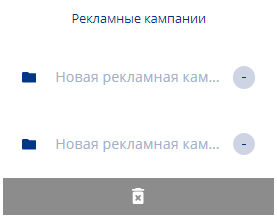
When selecting an advertising campaign via a checkbox/tick, a sidebar with selected advertising campaigns will appear on the right. Inside this sidebar, you can deselect using the "-" icon or delete the selected item/items using the trash can icon.
Sidebar appearing on the right when selecting advertising campaigns